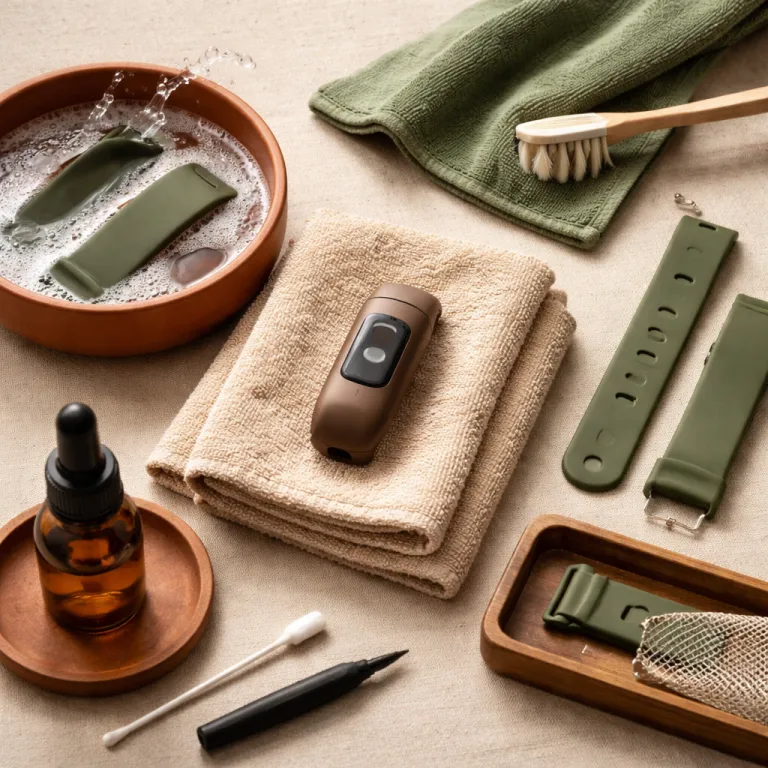
Why fitness tracker care maintenance matters more than specs
Your fitness tracker will usually fail from neglect long before the electronics die. Most people focus on smart features and ignore basic care and maintenance that actually keep a fitness device running smoothly. If you want reliable heart rate data and long battery life, you must treat the tracker like everyday wearable tech, not a disposable gadget.
Think about what your smartwatch or smart watch lives through each week, from sweat and soap to extreme temperatures in a hot car or a winter run. The band absorbs salt, the watch body traps moisture, and the charging contacts quietly corrode while you sleep, which slowly undermines both smartwatch fitness accuracy and charging reliability. Proper fitness tracker care maintenance is less about fancy tech tips and more about boring habits that help keep fitness trackers, smart watches, and every other wearable working when you actually need them.
When you buy an Apple Watch, a Fitbit Charge, a Garmin Venu, or any other tracker, you are really buying three things. You get a sensor packed device, a band or several bands, and a promise that this piece of wearable tech will help you move more and keep fitness goals visible on your wrist. That promise only holds if you clean the tracker regularly, protect it from water damage beyond its rating, and know when a simple repair or repair service on the strap or battery is smarter than replacing the whole smartwatch.
Water resistance, showers, and what ratings really mean
Water resistance on a fitness tracker sounds reassuring, but the label hides nuance. A device marked as water resistant to 50 metres is tested in static lab conditions, not in a hot shower with soap, shampoo, and sudden temperature swings that stress seals and gaskets. If you want your smartwatch fitness sensors and battery to last, treat water resistance as a safety net, not a challenge.
For everyday use, remove the watch before hot showers, saunas, or hot tubs, because extreme temperatures and steam can push water past seals and into the device housing. Swimming within the stated rating is usually fine for modern fitness trackers, yet you should still rinse the tracker and bands in fresh water after pool sessions to remove chlorine or salt that can attack metal parts and shorten battery life. If you use a Whoop, Garmin Forerunner, or Apple Watch for regular pool work, read a detailed water resistance guide such as the analysis of whether the Whoop band is water resistant, then build your own rules that keep fitness goals aligned with realistic maintenance.
Drying matters as much as rinsing, so always pat the smartwatch and band with a soft free cloth after exposure to water. Choose a lint free microfiber cloth so fibres do not clog the optical heart rate sensor or charging contacts, and use a cotton swab around the edges of the case where droplets hide. These simple maintenance tips reduce the risk of corrosion, cut down on the need for repair service, and help your fitness tracker care maintenance routine protect both the tech and your skin.
Straps, skin, and the real weak point of every wearable
The band is usually the first part of a fitness tracker to fail. Silicone bands soak up sweat and skin oils, nylon traps bacteria, and leather bands hate water, yet most buyers never think about strap maintenance until rashes or cracks appear. If you want your smartwatch fitness setup to feel comfortable and hygienic, you must treat the strap as a consumable part of the device.
Clean the band after hard workouts with lukewarm water and a tiny drop of mild soap, then rinse thoroughly and dry with a lint free cloth before you put the watch back on. For leather bands, avoid soaking them, wipe with a barely damp free cloth, then condition occasionally with a leather specific product so the material stays supple and less likely to crack under everyday wearable tech stress. If you rotate between several bands, you reduce constant moisture exposure on any single strap, which helps keep fitness trackers more comfortable and cuts down on the temptation to overtighten the watch when it feels sticky.
Skin health matters as much as device health, so slide the smartwatch a finger width up or down your wrist once in a while to let the skin breathe. Moisture wicking long sleeve shirts designed for training can also help by pulling sweat away from the band area, as explained in guides to stay dry and comfortable with long sleeve shirts designed for moisture wicking. When a band smells bad even after cleaning, shows deep cracks, or causes irritation, treat a replacement strap as routine maintenance, not a failure, because a fresh band is cheaper than a full repair or a new fitness tracker.
Cleaning sensors, charging ports, and keeping data honest
A dirty sensor turns a good fitness tracker into a bad liar. Sweat, sunscreen, and dead skin build up around the optical heart rate window and charging pins, which makes smartwatch fitness data noisy and charging unreliable. If your Apple Watch or Garmin suddenly shows strange heart rate spikes or drops, the first fix is almost always a proper clean, not a software reset.
Once or twice a week, wipe the underside of the device with a slightly damp lint free cloth, then dry it carefully before wearing it again. For heavy sweaters or people training daily, use a cotton swab lightly moistened with water around the green PPG heart rate LEDs and SpO2 sensors, taking care not to scratch the glass or push debris into gaps that could compromise water resistant seals. When residue is stubborn, a tiny amount of mild soap on the cloth can help, but avoid harsh chemicals that attack the plastics and adhesives holding your wearable tech together.
Charging ports need the same level of care, because corrosion on pogo pins is a common reason people think they need repair or a new device. Always make sure the tracker and band are completely dry before docking, then occasionally clean the contacts with a dry cotton swab to remove sweat salts that creep in during daily wear. If you keep this cleaning routine, your clean smartwatch will charge consistently, the battery will age more gracefully, and you will delay any need for professional repair service on the charging system.
Battery life, storage habits, and when repair still makes sense
Battery life rarely collapses overnight, it fades with patterns. Constantly running the screen at maximum brightness, hammering GPS, and charging from zero to one hundred percent every day will age any smartwatch battery faster than moderate use. A little discipline in how you charge and store the device can add years to your fitness tracker care maintenance payoff.
Try to keep the battery between roughly twenty and eighty percent for daily use, topping up during a shower or while you sit at your desk instead of deep cycling it every time. Avoid leaving the watch or tracker in extreme temperatures, such as a hot car dashboard or a freezing garage, because both heat and cold accelerate chemical wear inside the battery and can damage seals that keep the device water resistant. If you plan to store a fitness tracker for a few months, charge it to around fifty percent, power it down, and keep it in a cool, dry drawer rather than on a charger or in direct sunlight.
At some point, every wearable reaches a crossroads where you must choose between repair and replacement. If the screen is fine, the sensors still track heart rate accurately, and only the battery life has dropped, a battery repair service can be cost effective, especially for premium smart watches and the Apple Watch line. When both the device and multiple bands are failing, or when newer wearable tech offers safety features you genuinely need, it can be smarter to retire the old tracker, yet the habits you built around cleaning, storage, and maintenance tips will make your next smartwatch fitness companion last longer from day one.
Weekly and monthly maintenance checklists that actually help
A simple checklist turns good intentions into habits that keep fitness trackers running smoothly. Each week, rinse and dry the band, clean the sensor window with a lint free cloth, and check that the watch sits snug but not tight so heart rate readings stay reliable without irritating the skin. Once a month, inspect bands for cracks, clean the charging contacts with a dry cotton swab, and quickly review your water exposure habits so you are not slowly defeating the water resistant design with hot showers or careless storage.
Every few months, back up your data, check for firmware updates that may improve battery life or sensor accuracy, and reassess whether your current mix of bands still fits your routine. If you use multiple devices, such as a smartwatch, a smart ring, and a chest strap, read long term durability reviews like the analysis of why many smart rings in the promised wearable revolution will not survive, then apply the same care logic across your whole tech drawer. The goal is simple yet powerful, you want each piece of wearable tech to serve you for as long as possible so you spend money on better fitness, not constant replacement.
FAQ
How often should I clean my fitness tracker and band ?
Clean the tracker body and band at least once a week, and after any very sweaty workout. Use lukewarm water and mild soap on silicone or nylon bands, then dry them with a lint free cloth before wearing. For leather bands, wipe them gently with a barely damp free cloth and avoid soaking them to keep the material in good condition.
Can I wear my smartwatch or fitness tracker in the shower ?
Most modern fitness trackers and smart watches are water resistant, but hot showers are harsher than lab tests. Heat, steam, and soap can stress seals and slowly push water into the device, increasing the risk of corrosion or fogging. To extend the life of the watch and reduce the chance of needing repair, it is safer to remove it before hot showers or saunas.
When should I replace the band instead of the whole device ?
Replace the band when you see deep cracks, peeling, or persistent odour that does not improve after cleaning. If the tracker itself still holds a charge, records heart rate reliably, and the screen works, a new band is usually all you need. Treat straps as consumable parts of wearable tech, because fresh bands are far cheaper than a new device.
How can I make my fitness tracker battery last longer over time ?
Keep daily charge levels roughly between twenty and eighty percent instead of constantly draining to zero. Avoid exposing the device to extreme temperatures, such as a hot car or freezing conditions, which accelerate battery wear. Turning down screen brightness and limiting always on display features can also help preserve long term battery life.
Is professional repair service worth it for an older smartwatch ?
Professional repair service is usually worth considering when the issue is limited to the battery or a single button, and the rest of the smartwatch still works well. For premium models such as recent Apple Watch or high end Garmin devices, a battery or minor hardware repair can be cheaper than buying a new tracker. If the screen, sensors, and bands are all failing, replacement often makes more financial sense than extensive repair.